
 Plugging an
infected USB pen drive into your PC will infect it in no time. If your
PC is a part of a public network, you must also protect it against
physical access. The most frequently affected areas in the
computer are the BIOS and the drives; these also affected through the
USB ports, Firewire interfaces and similar hardware. The
following hardware protection measures are helpful.
Plugging an
infected USB pen drive into your PC will infect it in no time. If your
PC is a part of a public network, you must also protect it against
physical access. The most frequently affected areas in the
computer are the BIOS and the drives; these also affected through the
USB ports, Firewire interfaces and similar hardware. The
following hardware protection measures are helpful.
Hint: BIOS password is a protection
measure that can be used to stop someone powering up a computer system or
making changes in some of the computers most sensitive area
 In case of the BIOS,
you can normally assign two passwords. The ‘User Password’ is requested while booting up the computer and the ‘Master Password’ prevents unauthorized changes to the BIOS settings. But
be careful! If you forget these passwords, the only solution will
be to reset the BIOS chip by removing the CMOS battery. Another
protection option is to allow the PC to boot only from the hard disk and
not from any other media. This prevents access through Linux Live CDs
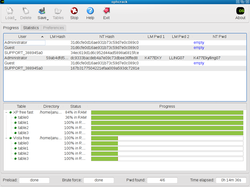
such as Ophcrack, which
determines the Windows password in a split-second. In the BIOS,
you may have disabled booting from floppy disk, USB stick or DVD drives.
But in order to protect a running PC, you require a tool that
monitors all these drives. The commercial utility DeviceLock does this job efficiently.
In case of the BIOS,
you can normally assign two passwords. The ‘User Password’ is requested while booting up the computer and the ‘Master Password’ prevents unauthorized changes to the BIOS settings. But
be careful! If you forget these passwords, the only solution will
be to reset the BIOS chip by removing the CMOS battery. Another
protection option is to allow the PC to boot only from the hard disk and
not from any other media. This prevents access through Linux Live CDs
such as Ophcrack, which
determines the Windows password in a split-second. In the BIOS,
you may have disabled booting from floppy disk, USB stick or DVD drives.
But in order to protect a running PC, you require a tool that
monitors all these drives. The commercial utility DeviceLock does this job efficiently.
You can find a demo
version at www.devicelock.com. Truecrypt, from
www.truecrypt.org ,
can encrypt your private data if your PC is often left in an
unsecure location. These measures will do a lot to keep you safe
and secure both online and offline.